
Coordination template
When to use Coordination
Section titled “When to use Coordination”Use Coordination when you want to review clash results from Navisworks and track coordination issues in Power BI.
Setup steps
Section titled “Setup steps”- Add your Navisworks model to Frame.
- Upload the XML file generated by Navisworks Clash Results.
- In the model drawer, find the section for Clash Results Files.
- Select the Clash Coordination template.
Local files option
Section titled “Local files option”If you do not want to upload files into Frame, you can use the normal XML files generated by Navisworks coordination as local files.
Report tabs
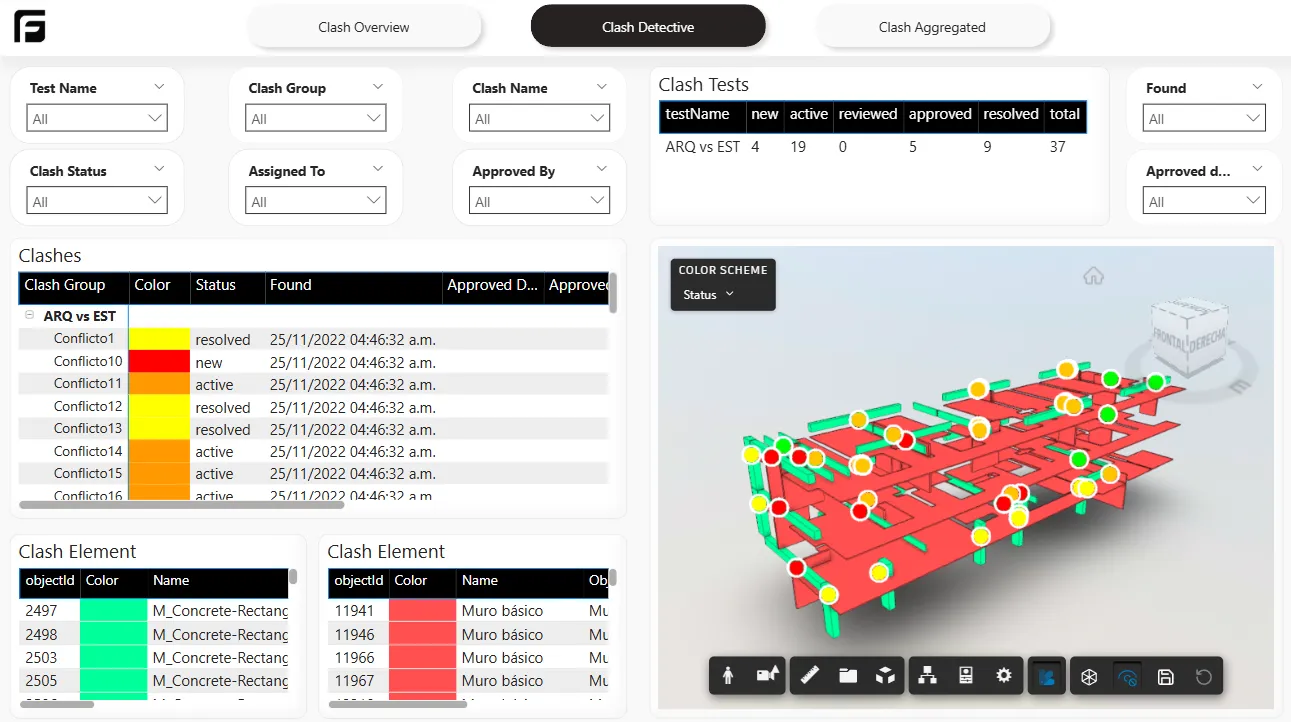
Section titled “Report tabs”The report includes three main tabs:
- Summary: a high-level view of the current clash report.
- Clash Detective: detailed clash results for review.
- Aggregate: updates as you upload new reports.
What this template is for
Section titled “What this template is for”This template is useful when your team needs:
- clash reporting in Power BI
- a summarized and detailed view of coordination issues
- a report that updates as new clash files are uploaded
Next step
Section titled “Next step”For the broader template catalog, see Power BI templates.